
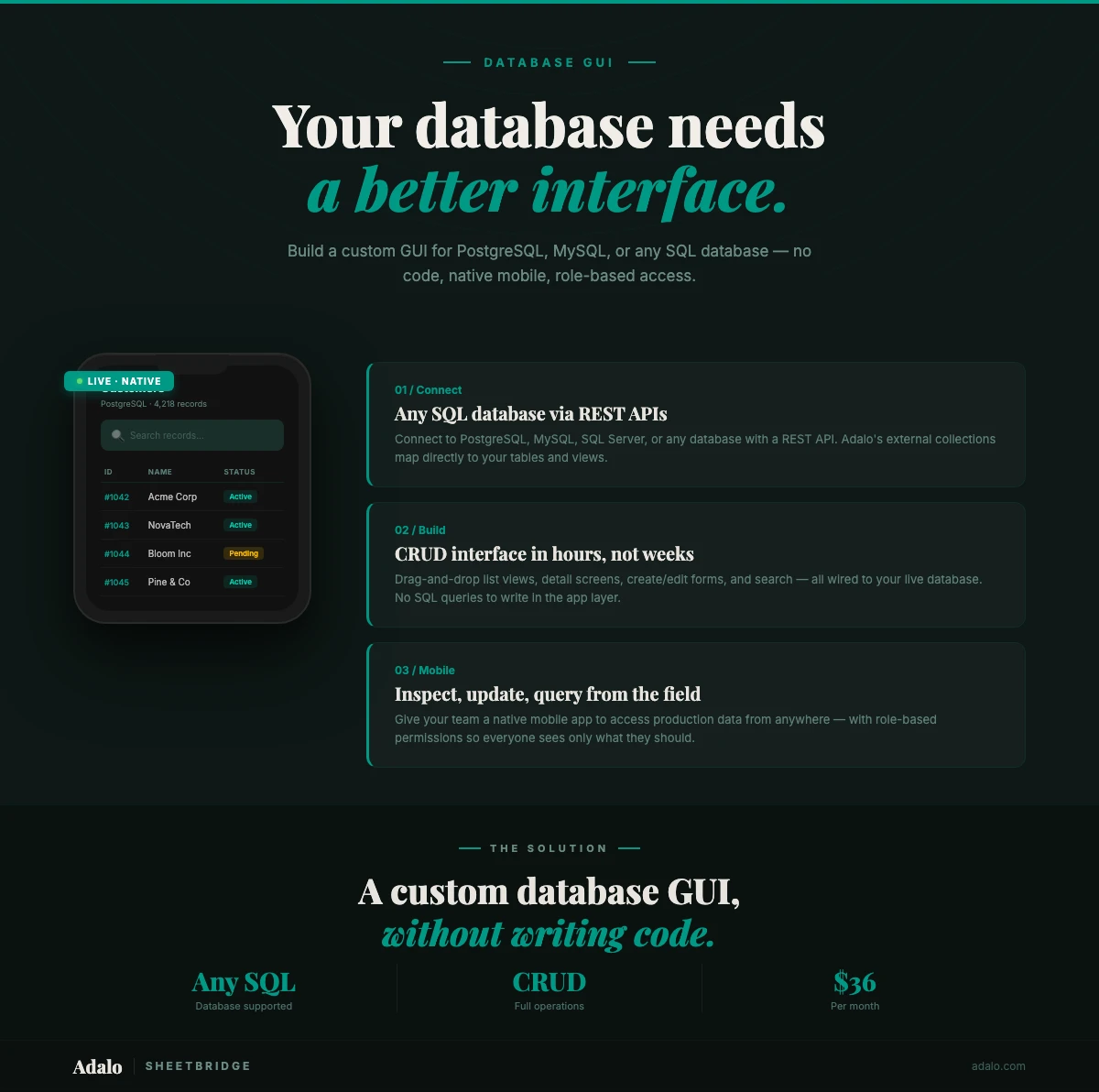
Your database holds everything your business runs on. Customers, orders, inventory, invoices, employee records. But the people who need that data every day are not database administrators. They are sales reps, warehouse managers, field technicians, and office staff who should never have to open a SQL client.
The usual fix is to build an internal tool. A custom GUI that sits on top of the database and gives non-technical users a clean way to view, create, update, and delete records. Historically, that meant hiring a developer to build a web app from scratch. Cost: $20,000 to $80,000. Timeline: 2 to 6 months. Or it meant buying a seat-based admin panel that charges per user and locks you into someone else's interface.
Adalo is a no-code app builder with a visual multi-screen canvas that lets you build a fully custom database GUI for web, native iOS, and native Android without writing code. Connect your SQL database via External Collections, map your tables and views, design the screens your team actually needs, and publish. Plans start at $36/mo with unlimited records. Ada, the AI builder, can generate your initial screens from a plain English description of what you need.
Here is how to do it.
What Is a Database GUI (and Why Build a Custom One)?
A database GUI (graphical user interface) is an application that lets users work with a database through forms, tables, buttons, and search fields instead of typing SQL commands.
CRUD operations without SQL knowledge. Create, Read, Update, Delete. That is what databases do. A GUI turns those into things normal people understand: fill out a form, browse a list, tap edit, confirm delete. Your team clicks buttons instead of writing queries.
Role-based access for different teams. A raw database connection gives everyone access to everything, including the ability to accidentally drop a table. A custom GUI lets you control exactly what each role can see and do. The warehouse team sees inventory with edit permissions. Sales sees customer records but not pricing internals. Finance gets invoice data with export.
Mobile access for field teams. SQL clients are desktop tools. They do not work on phones. And they definitely do not work when your technician is standing in a customer's basement trying to look up a part number. A native mobile database GUI gives field workers the data they need on-site, plus the ability to create and update records using their phone's camera, GPS, and barcode scanner.
So why build a custom GUI instead of using an off-the-shelf admin panel?
- Your workflow is not generic. Pre-built admin panels show tables and forms. Your team needs screens designed for how they actually work. A dispatch board for drivers. A pick-list for warehouse staff. A customer timeline for account managers.
- Your users are not database-savvy. Even "user-friendly" SQL clients assume you know what joins and foreign keys are. A custom GUI hides all of that behind screens that make sense to someone who has never touched a relational database.
- You need it on mobile. Most admin panels are web-only. If your team works in the field or on a warehouse floor, they need a native app that works like the apps on their personal phone. Fast, responsive, built for a small screen.
Connect Any SQL Database to a Visual App
Adalo connects to external databases through External Collections. You map a REST API endpoint to a data source inside the visual multi-screen canvas. Any database with a REST API becomes available to your Adalo app.
Direct REST API connections. If your database already has a REST API layer (many modern applications do), you can connect it directly to Adalo. Point the External Collection at your API endpoints, map the fields, and the data appears in your app.
Supported databases:
- PostgreSQL — The most common choice for modern applications. Connect via any PostgreSQL REST API adapter or middleware. See our PostgreSQL integration guide for a detailed walkthrough.
- MySQL / MariaDB — Widely used in web applications and legacy systems. Connect through REST API middleware or managed API services.
- Microsoft SQL Server — The standard in enterprise Windows environments. See our guide on creating an app using MS SQL data.
- Oracle Database — Common in large enterprises. Connect via Oracle REST Data Services (ORDS) or middleware.
- SQLite — Lightweight databases used in local or embedded applications. Expose via a thin REST API layer.
DreamFactory middleware for instant API generation. If your database does not have a REST API, DreamFactory generates one automatically. Point DreamFactory at your database and it creates a REST API for every table, view, and stored procedure, with authentication, rate limiting, and role-based access included. Then connect that API to Adalo's External Collections. No code on either end.
DreamFactory supports over 20 database types including PostgreSQL, MySQL, MS SQL, Oracle, MongoDB, and Snowflake. It is the fastest path from "I have a database" to "I have a mobile app connected to it."
For more on connecting SQL databases to no-code tools, see our guide on integrating SQL databases with no-code tools.
Step-by-Step: Build a Database GUI with Adalo
This takes about 30 minutes for a basic CRUD interface, or 2 to 4 hours for a polished multi-screen app with search, filtering, and permissions.
Step 1: Set Up Your API Layer
If your database already has a REST API, skip to Step 2. If not, set up DreamFactory or another API middleware.
- Install DreamFactory (cloud-hosted or self-hosted)
- Connect it to your database by providing host, port, credentials, and database name
- DreamFactory auto-generates REST endpoints for every table and view
- Test the endpoints — you should be able to GET, POST, PUT, and DELETE records via the API
- Note your API base URL and authentication credentials
Step 2: Create External Collections in Adalo
Open your Adalo project and navigate to the database panel. Create a new External Collection for each database table you want to expose in the app.
- Enter the API base URL and authentication headers
- Map the GET endpoint (for listing records), GET by ID (for single records), POST (for creating), PUT (for updating), and DELETE
- Adalo auto-detects the field types from the API response — text, number, date, boolean, image URL
- Test each endpoint directly in the Adalo editor to confirm data flows correctly
Step 3: Build List and Detail Screens
Now build the screens your users will actually use every day.
- List screen: Add a list component connected to your External Collection. Configure which fields display in each row (a primary identifier, a status indicator, maybe a key metric). Add tap actions to navigate to the detail screen.
- Detail screen: Display all fields for a single record. Organize them logically with section headers. Add edit and delete buttons with appropriate confirmation dialogs.
- Form screens: Create separate screens (or modals) for adding new records and editing existing ones. Use Adalo's form components: text inputs, dropdowns, date pickers, toggle switches. Map each to your database fields.
Step 4: Add Search and Filter
A database GUI without search is just a very long scrolling list. Add these components to make the data navigable:
- Search bar: Add a text input that filters the list by a primary field (name, ID, or title). Connect it to the list's filter property.
- Filter buttons or dropdowns: Add category filters, status filters, or date range selectors above the list. These narrow the displayed records to relevant subsets.
- Sort controls: Let users sort by date, name, status, or any numeric field. Ascending and descending toggle.
Step 5: Set Up Permissions and Roles
Adalo's built-in user authentication lets you create role-based access without any backend work.
- Add a "role" field to your Users collection (admin, manager, viewer, field-worker)
- Use visibility conditions to show or hide screens, buttons, and data based on the logged-in user's role
- Restrict edit and delete actions to admin or manager roles
- Filter lists so users only see records assigned to them (e.g., a technician sees only their work orders)
- Hide navigation items for screens a user's role cannot access
Step 6: Publish and Deploy
Once your screens are built and tested, publish.
- Web: Adalo hosts the web version automatically. Share the URL with your team.
- iOS: Publish to the Apple App Store for team distribution or use TestFlight for internal testing.
- Android: Publish to the Google Play Store or distribute the AAB file internally.
All three platforms come from the same project in the visual multi-screen canvas. Design once, publish everywhere.
Essential Features for a Database GUI
If you want your team to actually use the thing, these features matter. Does not matter whether it is an inventory database, a CRM, or a field service system.
Full CRUD operations. Users need to create records, read existing ones, update fields, and delete entries from the app. Every table your GUI exposes should support all four operations, with permissions controlling who can do what.
Search and filtering. Nobody scrolls through 10,000 records to find what they need. Your GUI needs a search bar that queries across key fields, plus filter controls for status, category, and date range. Bad search is the number one reason internal tools get abandoned.
Role-based access control. Different users need different permissions. A warehouse worker should be able to update inventory quantities but not modify product pricing. A sales rep should see customer records but not financial data. Build these roles into the app from day one.
Data export. Even with a polished GUI, people sometimes need data in a spreadsheet. Include CSV export or direct Google Sheets sync for users who need to run their own analysis or share data with people who do not have app access.
Push notifications for data changes. When something needs human attention (new order, inventory below threshold, escalated ticket), the app should notify the right person. Push notifications are one of the biggest advantages of a native app over a web-only admin panel. They reach users even when the app is closed.
Audit trail and change history. For sensitive data, track who changed what and when. Display a change log on the detail screen so users can see the history of a record. This matters for compliance, debugging, and accountability.
Works on every device. Your GUI will be used on phones in the warehouse, tablets on the factory floor, laptops in the office. It needs to work on all of them. Adalo's visual multi-screen canvas handles responsive layouts natively and adapts your design to the device without extra work.
Database GUI Builders Compared
Several platforms let you build database front-ends without code. Here is how they compare.
| Feature | Adalo | Retool | Budibase | Appsmith | Glide |
|---|---|---|---|---|---|
| Native mobile apps | Yes — iOS, Android, web from one project | No — web only (mobile-responsive) | No — web only | No — web only | Yes — progressive web apps (not native) |
| Push notifications | Yes — native push on iOS and Android | No | No | No | Limited |
| SQL database support | Via External Collections (REST API) | Direct connections to 20+ databases | Direct connections to PostgreSQL, MySQL, MS SQL, and more | Direct connections to 20+ databases | Via API integrations |
| AI builder | Ada — generates screens and workflows from text | AI code assistant for queries and transformations | AI field generation | AI code assistant | AI column generation |
| Starting price | $36/mo (unlimited records) | $10/user/mo (minimum 5 users) | Free (self-hosted), $50/mo (cloud) | Free (self-hosted), pricing varies (cloud) | Free tier, $25/mo (Pro) |
| Self-hosting | No — cloud-hosted | Yes — self-hosted option | Yes — open source, self-hosted | Yes — open source, self-hosted | No — cloud-hosted |
| Best for | Teams needing native mobile + web database access | Engineering teams building complex internal tools | Teams wanting open-source with self-hosting control | Developer-heavy teams wanting customization | Simple data apps from spreadsheets |
Where Adalo wins: If your database GUI needs to be a native mobile app, Adalo is the only option here that compiles to native iOS and Android from a visual builder. Retool, Budibase, and Appsmith are web-only. Glide produces progressive web apps, not native ones. For desk workers on laptops, any of these tools can build a solid database GUI. But for teams in the field, on warehouse floors, or at customer sites, native mobile is not optional.
Where other tools win: Retool and Appsmith offer direct SQL connections. You can write raw SQL queries inside the builder, which gives engineering teams fine-grained control over every query. Budibase and Appsmith are open source and self-hostable, which matters if you have strict data residency requirements. Retool has the deepest library of pre-built components for things like table editing, JSON viewers, and chart builders.
If native mobile access and a non-technical user base are priorities, Adalo is the strongest fit. If direct SQL access and self-hosting matter more, look at Budibase or Appsmith.
When to Use Native Mobile for Database Access
A web-based admin panel works fine when your team sits at desks. But many teams that need database access do not work at desks. They work in the field, in warehouses, at customer sites. For these teams, a native mobile database GUI is the only practical option.
Building and property inspectors. An inspector walks through a property with a checklist, takes photos of violations, notes conditions, files the report. A native app lets them pull up the inspection record, tap through the checklist, snap photos that auto-attach to the record, and capture GPS coordinates for each finding. Everything goes straight to the database from their phone. No laptop to carry. No paper forms to transcribe later.
Warehouse and inventory teams. Warehouse staff need to receive shipments, update stock counts, pick orders, and log discrepancies. Speed matters. A native app with barcode scanning turns a 30-second lookup-and-type process into a 2-second scan-and-confirm. Multiply that by hundreds of items per shift. GPS tracking lets managers see which zone each worker is in, and push notifications alert the team when a priority order needs picking.
Field service technicians. Plumbers, electricians, HVAC techs, maintenance workers. They all need work orders, customer history, and parts inventory while standing in front of the problem. A native database GUI lets them pull up the work order, check service history, look up the replacement part number, log time, capture a photo of the completed work, and collect a digital signature. No trip back to the office.
Delivery drivers. Routes, addresses, special instructions, proof-of-delivery photos, customer signatures, real-time status updates to dispatchers. All of this needs to work on a phone, in transit, with spotty connectivity. A native app handles this better than any web-based tool because it can cache data locally and sync when the connection comes back.
Sales representatives. A sales rep at a client meeting needs the client's order history, pricing, inventory availability, and account notes. They might need to create a quote or place an order right there. A native database GUI is fast and looks professional. Fumbling with a mobile browser loading a web admin panel does not.
The common thread: device capabilities. Native apps can access the camera for barcode scanning, GPS for location tracking, and push notifications for real-time alerts. Web apps in a browser have limited access to these features. If your database GUI needs any of this, go native.
Adalo builds native iOS and native Android apps from the same project on the visual multi-screen canvas. No separate codebases. Ada, the AI builder, can generate the initial screens. Describe "I need a field service app that shows work orders, lets techs take photos and collect signatures" and Ada creates the starting point. Customize from there, connect to your database via External Collections, and publish to both app stores. Plans start at $36/mo with unlimited records.
Frequently Asked Questions
Can I connect Adalo directly to my PostgreSQL or MySQL database?
Adalo connects to external databases through REST APIs via External Collections. If your database already has a REST API, you connect directly. If not, middleware like DreamFactory auto-generates one for your database in minutes. This works with PostgreSQL, MySQL, MS SQL, Oracle, and most databases that support standard connectivity.
Do I need a developer to set up the database connection?
For databases that already have a REST API, no — you can configure External Collections in Adalo yourself. If you need to set up API middleware like DreamFactory, some familiarity with server configuration helps, but DreamFactory offers a cloud-hosted option that requires no server management. Once the API is in place, building the GUI in Adalo is entirely no-code using the visual multi-screen canvas.
How does Adalo handle large databases with thousands of records?
Adalo's External Collections support pagination, so the app loads records in batches rather than all at once. Combine this with server-side filtering (your API handles the query and returns only matching results) to keep the app responsive even with very large datasets. Paid plans include unlimited records, so there is no cap on how much data your app can access.
Can different team members have different access levels?
Yes. Adalo has built-in user authentication and supports role-based access. You create user roles (admin, manager, viewer, field-worker) and use visibility conditions to show or hide screens, buttons, and data based on the logged-in user's role. A warehouse worker might see inventory with edit access, while a finance team member sees the same data as read-only.
Is my database data secure when connected to Adalo?
Adalo connects to your database through encrypted HTTPS API calls. Your database credentials are stored in the External Collection configuration, not in the app itself. Users of the app never see or interact with the API directly — they interact with the screens you design. You control which tables and fields are exposed through the API layer, and Adalo's role-based permissions add another layer of access control within the app.
What is Adalo?
Adalo is a no-code app builder for creating native mobile and web applications without writing code. It has a visual multi-screen canvas for designing app screens, Ada (an AI builder) for generating apps from text descriptions, External Collections for connecting to SQL databases and REST APIs, a built-in database with unlimited records on paid plans, and one-click publishing to the Apple App Store, Google Play Store, and the web. Plans start at $36/mo. Learn more at adalo.com.

Build your app fast with one of our pre-made app templates
Begin Building with no codeRelated Content

Custom No-Code App Development: 10 Things You Can Build with Adalo
Build professional native apps without code — marketplaces, delivery, social, learning, real estate and more using a visual drag-and-drop pl
No-Code E-commerce App Development: Build Your Store with Adalo
Build a full-featured mobile and web e-commerce app without coding—product catalogs, carts, secure payments, user accounts, and store publis
No-Code Job Board and Career Platform: Build It with Adalo
Step-by-step guide to create a native mobile job board with search, filters, employer dashboards, push notifications, and app store publishi

Free No-Code Mobile App Development for Startups: Adalo's Free Tier Guide
Build and test mobile app prototypes for free with a drag-and-drop no-code builder, AI setup, a 200-record database, and shareable previews.