
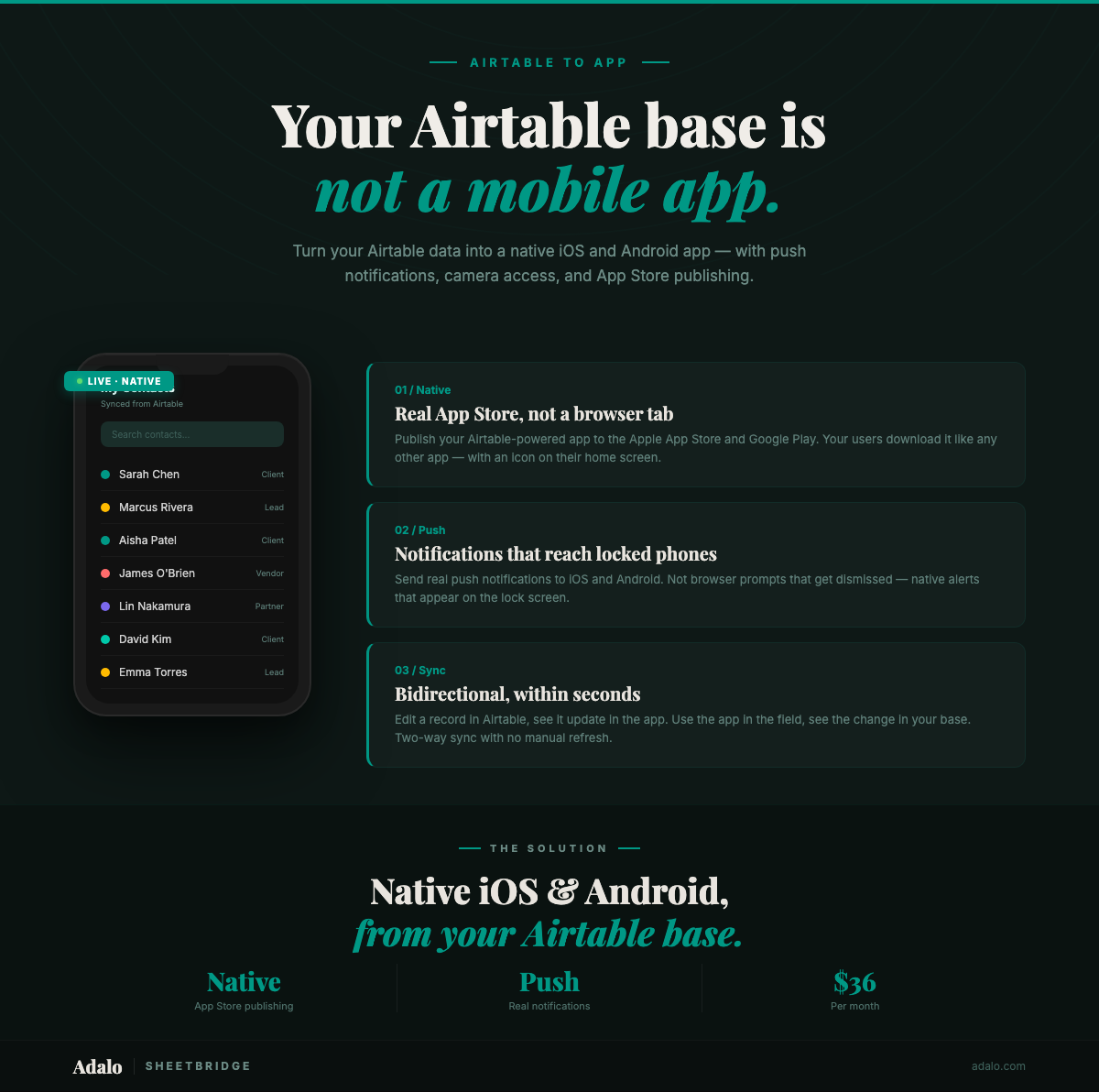
You have spent weeks, maybe months, building the perfect Airtable base. Your data is clean, your views are dialed in, your automations hum along. But then someone asks: "Can we get this on our phones?" And suddenly you are staring at the gap between a great database and a great app.
Airtable is great at what it does: structuring and relating data. But it was never designed to be a mobile app. It does not publish to the App Store. It cannot send real push notifications. It cannot access your phone's camera or GPS. And its Interface Designer, while useful for internal dashboards, produces web views — not native mobile experiences your team or customers will actually want to use daily.
This guide shows you how to bridge that gap. You will learn how to connect your existing Airtable base to Adalo, build a native iOS and Android app on top of your data without migrating a single record, and publish it to the Apple App Store and Google Play. No code required.
Why Airtable Alone Isn't Enough for Mobile
Airtable is genuinely good at organizing structured data. It feels like a spreadsheet but works like a relational database, and millions of teams rely on it. But there is a hard boundary between "great database" and "great mobile app." Airtable sits firmly on the database side of that line.
No App Store presence. You cannot publish an Airtable base (or an Airtable Interface) to the Apple App Store or Google Play. Full stop. This means your users cannot find your tool in the store, install it like a normal app, or get automatic updates. Instead, they get a bookmarked URL that opens in a mobile browser, which feels like a second-class experience compared to a real app on their home screen.
No push notifications. Airtable has automations that can send emails and Slack messages, but it cannot send native push notifications to a user's phone. For time-sensitive workflows (new order alerts, approval requests, field assignment updates), push notifications are not a nice-to-have; they are the difference between a 2-minute response time and a 2-hour response time.
No camera or device access. Airtable's mobile app lets you take photos and attach them to records, but it does not give you the ability to build custom camera workflows: barcode scanning, document capture with automatic OCR, photo capture with GPS tagging, or video recording with timestamps. Field teams need these features, and they require native device access that Airtable cannot provide.
No GPS integration. You can manually enter location data into an Airtable field, but you cannot automatically capture a user's GPS coordinates when they submit a record. For delivery tracking, field service check-ins, and property inspections, automatic GPS capture is essential. It requires a native app.
Interface Designer limitations. Airtable's Interface Designer lets you create custom views on top of your data: dashboards, forms, record detail pages. It is useful for internal reporting, but it has significant limitations as a user-facing application:
- Interfaces are web-only. They do not produce native mobile apps
- Design flexibility is limited to pre-built layout blocks, not a freeform canvas
- Navigation between interfaces is clunky with no concept of screen-to-screen app navigation
- User authentication is tied to Airtable seats, so each user needs an Airtable account
- No custom branding. Interfaces carry Airtable's UI chrome, not your brand
None of this makes Airtable a bad product. It just means Airtable is for data management, not app delivery. Many teams have outgrown that boundary. They need their Airtable data to power a real application with screens, navigation, user roles, and push notifications. That is where Adalo comes in.
Airtable + Adalo: The Complete Stack
Airtable handles your data on the backend. Adalo builds the native app on the frontend. Your data stays in Airtable. Your app lives in Adalo. They talk to each other in real time through External Collections.
What are External Collections?
External Collections are Adalo's mechanism for connecting to external data sources. When you set up an Airtable External Collection, Adalo reads your Airtable base's schema (tables, fields, field types) and maps them to Adalo's internal data model. Your app's screens and components then display and interact with Airtable data as if it were stored natively in Adalo.
For a technical deep-dive into connecting the two platforms, read our guide on connecting Adalo and Airtable.
Bidirectional sync. External Collections are not a one-way mirror. When a user views data in your Adalo app, it is pulled from Airtable in real time. When a user creates, updates, or deletes a record in the app, that change is written back to Airtable immediately. Your Airtable base remains the single source of truth, and your app is a live window into it.
This means you do not have to choose between Airtable and Adalo. Your team members who love working in Airtable's grid view can keep doing exactly that. Your field workers, customers, and non-technical users get a polished native app. Both groups are working with the same data, in real time.
For more on keeping data synchronized between the two platforms, see our post on syncing data between Adalo and Airtable.
What stays in Airtable:
- Your data tables and relationships
- Your views, filters, and sorts
- Your automations (email triggers, Slack notifications, formula fields)
- Your integrations with other tools (Zapier, Make, direct API connections)
- Your reporting and dashboard interfaces
What Adalo adds:
- Native iOS and Android apps published to the App Store and Google Play
- Push notifications triggered by data changes or schedules
- Camera access for photo capture, barcode scanning, and document scanning
- GPS integration for automatic location tagging
- Custom user authentication (users do not need Airtable accounts)
- Branded, polished UI designed on a visual multi-screen canvas
- Screen-to-screen navigation with transitions
Airtable is your database layer. Adalo is your application layer. Neither replaces the other.
Step-by-Step: Airtable Base to Published App
Here is the exact process for turning an existing Airtable base into a published native mobile app using Adalo. We will use a real example: a client management base with tables for Clients, Projects, and Tasks.
Step 1: Prepare your Airtable base
Before connecting to Adalo, make sure your Airtable base is structured cleanly:
- Use consistent field naming (no spaces or special characters where possible)
- Make sure primary fields are descriptive (these become the display labels in your app)
- Set up linked record fields for relationships between tables (Clients → Projects → Tasks)
- Create an Airtable Personal Access Token with read and write access to the base you want to connect
You do not need to change your data or restructure your base. Adalo works with your existing schema. Just make sure the basics are in order.
Step 2: Connect Airtable to Adalo via External Collections
In Adalo, create a new app (or open an existing one). Go to the Database section and select "Add External Collection." Choose the Airtable integration, paste your Personal Access Token, and select the base and table you want to connect.
Adalo reads your table's field structure and maps each Airtable field to an Adalo property type:
- Single Line Text → Text
- Number → Number
- Date → Date/Time
- Attachment → File/Image
- Single Select → Text (with predefined options)
- Linked Record → Relationship
Repeat this for each table in your base. For our example, you would create three External Collections: Clients, Projects, and Tasks.
Step 3: Let Ada generate your screens
With your data connected, use Ada (Adalo's AI builder) to generate the initial app structure. Describe your app: "A client management app with a list of clients, a detail screen for each client showing their projects, a project detail screen showing tasks, and a form to add new tasks."
Ada generates a working set of screens in about 30 minutes of your time: list screens, detail screens, forms, and the navigation logic connecting them to your External Collections. You get a functional app connected to your live Airtable data. Not a wireframe. Not a mockup.
Step 4: Customize the design on the visual multi-screen canvas
Adalo's visual multi-screen canvas shows all your screens at once and lets you refine each one by dragging and dropping components. For the client management app:
- Client List screen: Customize the list layout to show client name, company, and a status badge. Add search and filter controls. Set up tap navigation to the Client Detail screen.
- Client Detail screen: Display all client information from Airtable, plus a list of related Projects (pulled from the linked record relationship). Add a "Call" button that triggers the phone dialer and an "Email" button that opens the mail app.
- Project Detail screen: Show project name, status, due date, and a list of related Tasks. Add a progress indicator calculated from completed vs. total tasks.
- Add Task form: Input fields mapped to your Airtable Tasks table: task name, description, assignee, due date, priority. When submitted, the new record appears in Airtable immediately.
Apply your brand colors, logo, and typography. The app should look like it belongs to your company, not to Adalo or Airtable.
Step 5: Add native features Airtable cannot provide
This is where the app earns its keep over an Airtable Interface:
- Push notifications: Set up notifications for new task assignments, overdue tasks, and project status changes. Your team gets alerted on their phone the moment something needs their attention.
- Camera integration: Add a photo capture component to task completion forms. Field workers can photograph completed work, damaged equipment, or site conditions and attach images directly to the task record in Airtable.
- GPS check-in: Add a location capture action to check-in screens. When a technician arrives at a client site, they tap "Check In" and the app records their GPS coordinates and timestamp. No manual address entry required.
For a detailed guide on setting up push notifications with Airtable-backed data, see our post on push notifications with Airtable.
Step 6: Set up user roles and authentication
Create a Users table in Adalo (this can be Adalo's built-in user system or an Airtable-based user table). Set up role-based access:
- Field workers: See only their assigned clients and tasks, can create reports and log check-ins
- Managers: See all clients, projects, and tasks, can assign work and view reports
- Clients (optional): See only their own projects and task statuses, a self-service portal view
Users sign in with email and password. They do not need Airtable accounts. Adalo handles authentication independently.
Step 7: Test and publish
Preview the app on your phone using Adalo's Previewer app. Verify that:
- Data from Airtable loads correctly on all screens
- New records created in the app appear in Airtable within seconds
- Changes made in Airtable appear in the app on refresh
- Push notifications fire correctly
- Camera and GPS features work on real devices
When everything looks good, publish. Adalo builds native iOS and Android apps from the same project and submits them to the Apple App Store and Google Play. Your team downloads the app, signs in, and starts working with their Airtable data through a polished native interface.
The whole process typically takes a day, depending on how complex your data model is and how much you customize the design. The Airtable connection itself takes about 15 minutes per table.
What Native Can Do That Airtable Apps Can't
The gap between Airtable Interfaces and a native mobile app is not about how things look. It is about what the app can actually do.
Push notifications that actually reach people. Native push notifications appear on your user's lock screen, in their notification center, and as badges on the app icon. They do not require the app to be open. They do not require a browser tab. They just work, the same way notifications from Messages or Slack work. For new order alerts, approval requests, or emergency field assignments, push notifications cut response times from hours to minutes.
Camera and barcode scanning. A native app has full access to the device camera. This enables:
- Barcode scanning: Point the camera at a barcode or QR code and instantly look up the associated record in your Airtable base. Essential for inventory management, asset tracking, and event check-ins.
- Photo documentation: Capture photos as part of a structured workflow: inspection reports, damage documentation, proof of delivery. Photos attach directly to the relevant Airtable record.
- Document scanning: Use the camera to capture receipts, invoices, business cards, or other documents. The image is stored in Airtable's attachment field.
GPS check-ins and location tracking. A native app can read the device's GPS to:
- Automatically tag reports and check-ins with latitude/longitude coordinates
- Verify that field workers are at the correct location before allowing them to start a job
- Display nearby clients or job sites on a map
- Track delivery routes and service calls throughout the day
Airtable has a "Geocode" field type, but it requires manual address entry and does not capture live GPS coordinates from the user's device.
App Store presence and distribution. Publishing to the Apple App Store and Google Play beats a web URL in a few concrete ways:
- Discoverability: Users can search for your app by name in the store
- Installation: One tap to install, automatic updates, appears on the home screen
- Credibility: An App Store listing looks professional. Customers and partners see a real app, not a shared spreadsheet link
- MDM compatibility: Enterprise IT teams can distribute the app through Mobile Device Management systems
Custom user experience. A native app built in Adalo gives you full control over what users see and do. You design every screen and every transition on the visual multi-screen canvas. Your app looks like your brand, not like Airtable. Users interact with polished cards, lists, and buttons instead of grid rows and column headers.
For many teams, the Airtable Interface is enough for internal back-office use. But the moment you need to put your data in front of field workers, customers, or non-technical users, a native app is the right answer.
Airtable App Builders Compared
Several platforms can turn Airtable data into some kind of application. Here is how they compare on the features that matter most. We have been fair to every platform; each has real strengths.
| Feature | Adalo | Glide | Softr | Stacker | Noloco |
|---|---|---|---|---|---|
| Native mobile apps | Yes — native iOS and Android | PWA only — not native | No — responsive web only | No — web only | No — web only |
| App Store publishing | Yes — Apple App Store and Google Play | No | No | No | No |
| Push notifications | Yes — native push on iOS and Android | Limited — PWA notifications | No | No | No |
| Camera / barcode | Yes — native device camera access | Limited — browser-based | No | No | No |
| GPS integration | Yes — automatic GPS capture | Limited | No | No | No |
| Airtable connection | External Collections — bidirectional sync | Direct integration — bidirectional | Direct integration — bidirectional | Direct integration — bidirectional | Direct integration — bidirectional |
| AI builder | Ada — generates app from description | AI layout generation from data | AI page builder | No AI builder | Auto-generated CRUD screens |
| Design flexibility | Full visual canvas — freeform drag-and-drop | Template-based — limited customization | Block-based — moderate customization | Block-based — limited customization | Template-based — limited customization |
| Starting price | Free (500 records), $36/mo Professional | Free (25 rows), $60/mo Pro | Free (limited), $59/mo Basic | $59/mo Starter | $49/mo Starter |
| Best for | Native mobile apps for field teams and customers | Simple data apps from spreadsheets | Client portals and websites from Airtable | Internal tools and client portals | Internal CRUD apps with automation |
Key differences that matter:
- Native mobile is the dividing line. Adalo is the only platform here that produces true native iOS and Android apps published to the App Store. Everything else creates web apps or PWAs. If your users are in the field, native mobile is not optional. It is the whole point.
- Push notifications separate real apps from web views. Only native apps can deliver reliable push notifications that appear on the lock screen regardless of whether the app is open. PWA notifications are unreliable on iOS and nonexistent on some Android versions.
- Design flexibility varies a lot. Adalo gives you a freeform visual canvas where you can place any component anywhere. Softr, Stacker, and Noloco use block-based or template-based builders that are faster for simple layouts but limiting when you need a specific design. Glide falls somewhere in between.
- All platforms connect to Airtable well. Every platform in this table has a solid Airtable integration with bidirectional data sync. The connection itself is not a differentiator. What you build on top of that connection is.
Choose Glide or Softr if you need a simple web portal on top of Airtable data. Choose Stacker or Noloco if you need internal CRUD screens with minimal design effort. Choose Adalo if you need a native mobile app with push notifications, camera access, GPS, and App Store presence, all connected to your existing Airtable data.
Real Use Cases: Airtable-Powered Native Apps
Four concrete examples of Airtable bases turned into native mobile apps with Adalo. Each one applies across industries.
1. Field Sales CRM
A regional sales team manages their client list, meeting notes, and deal pipeline in Airtable. The problem: reps in the field cannot efficiently access or update client records from their phones. Airtable's mobile app shows raw table data, not a sales-optimized interface.
The Adalo app gives each rep a personalized dashboard showing their assigned clients, sorted by proximity (using GPS). They tap a client to see the full history, log a meeting note with voice-to-text, snap a photo of a whiteboard from the meeting, and update the deal stage. All in under a minute. Push notifications alert reps when a deal is reassigned or a follow-up is overdue. Managers see pipeline metrics in real time without asking reps to "update the spreadsheet."
For a step-by-step guide to building this type of app, see our tutorial on building a CRM with Adalo and Airtable.
2. Inventory and Asset Tracking
A facilities management company tracks equipment, maintenance schedules, and asset locations in Airtable. Field technicians need to scan equipment barcodes, log maintenance actions, and capture photos of completed work. Airtable's Interface Designer cannot handle any of this natively.
The Adalo app uses the device camera for barcode scanning: a technician points their phone at an equipment tag, and the app instantly displays that asset's full history: last service date, next scheduled maintenance, assigned location, open issues. They complete a maintenance form with photos, and the record updates in Airtable immediately. GPS automatically logs which facility they are at. Managers receive push notifications for overdue maintenance items.
3. Client Portal
A marketing agency tracks projects, deliverables, and feedback in Airtable. Clients currently receive weekly email updates with status reports, a process that takes the account manager 30 minutes per client per week and always feels outdated by the time the email lands.
The Adalo app gives each client a branded portal where they can see their active projects, review deliverables, leave feedback, and approve work, all in real time, pulling directly from Airtable. Push notifications alert clients when a new deliverable is ready for review. The account manager's weekly update emails are replaced by a self-service app that clients actually prefer. The agency saves 2+ hours per week per account manager.
4. Event Management
An event planning company manages venues, vendors, schedules, and guest lists in Airtable. On event day, the coordinator needs a mobile command center, not a spreadsheet.
The Adalo app provides a day-of-event view showing the timeline, vendor check-in status, and task assignments. Vendors check in by scanning a QR code at the venue entrance (barcode scanning via the app). The coordinator can reassign tasks on the fly and send push notifications to the team ("Florist arriving 15 minutes late, adjust timeline"). GPS confirms that all vendors are on-site. Guest check-in uses a searchable list with one-tap confirmation, replacing printed lists and manual counting. At the end of the event, all data is in Airtable, timestamped and ready for the post-event report.
Same pattern every time: Airtable holds the data, Adalo provides the mobile experience. Your existing Airtable workflows and automations keep working. The app is an additional layer, not a replacement.
For more on what you can build with Airtable and Adalo together, visit our Airtable to App product page.
FAQ
Do I need to migrate my data out of Airtable to use Adalo?
No. Adalo connects to your Airtable base via External Collections, which create a live, bidirectional link to your data. Your records stay in Airtable. Your automations, views, and integrations keep working. The Adalo app reads from and writes to Airtable in real time. No data migration, no duplication, no sync conflicts.
Will changes in my Airtable base appear in the app automatically?
Yes. When a user opens a screen or refreshes a list in the Adalo app, it pulls the latest data from Airtable. Changes made in Airtable (new records, updated fields, deleted rows) are reflected in the app. Similarly, changes made in the app are written back to Airtable immediately. Both platforms always show the same data.
How much does it cost to turn my Airtable base into a native app?
Adalo's Professional plan costs $36/mo and includes unlimited records and unlimited app users. You also need an Airtable plan that supports API access. Airtable's free plan includes API access with rate limits, and their paid plans ($20/user/mo and up) offer higher limits. For most teams, the total cost is $36/mo for Adalo plus whatever you are already paying for Airtable.
Can my app work with multiple Airtable tables and linked records?
Yes. You can create a separate External Collection for each Airtable table, and Adalo supports relationships between collections, mirroring the linked record relationships in your Airtable base. A client record in the app can display its related projects, and a project can display its related tasks, just as they are linked in Airtable.
How long does it take to build and publish the app?
Connecting Airtable to Adalo takes about 15 minutes per table. Using Ada, Adalo's AI builder, to generate the initial screens takes about 30 minutes. Customizing the design and adding native features (push notifications, camera, GPS) takes 2–4 hours depending on complexity. The App Store review process adds 1–3 days for the first submission. Total: you can go from Airtable base to published app in under a week, with most of the work done in a single day.
Are there limits on how much Airtable data the app can handle?
Adalo's Professional plan supports unlimited records. The practical limit is Airtable's API rate limits: 5 requests per second on Airtable's free and Plus plans, and higher limits on Pro and Enterprise plans. For most apps, even those with thousands of records, this is not an issue. If you have an extremely high-volume use case (hundreds of concurrent users making rapid updates), you may want to consider Airtable's Enterprise plan for higher API throughput.
What is Adalo?
Adalo is a no-code app builder that lets anyone create native iOS, Android, and web applications without writing code. It features Ada, an AI builder that generates app structures from plain-language descriptions, and a visual multi-screen canvas for designing and connecting screens. Adalo connects to external data sources like Airtable, Google Sheets, and any REST API via External Collections, letting you build native mobile apps on top of your existing data without migration. Plans start free (500 records) with paid plans from $36/mo for unlimited records.

Build your app fast with one of our pre-made app templates
Begin Building with no codeRelated Content
No-Code Job Board and Career Platform: Build It with Adalo
Step-by-step guide to create a native mobile job board with search, filters, employer dashboards, push notifications, and app store publishi

Google Sheets to Mobile App: No-Code Guide with Adalo
Turn Google Sheets into a mobile app with Adalo. Follow this no-code guide to create a powerful, data-driven app in just a few steps.
The 2026 Pricing Guide for No Code Mobile App Maker Platforms: Key Factors to Consider
The 2026 Pricing Guide for No Code Mobile App Maker Platforms: Key Factors to Consider
Adalo simplifies choosing an AI-Native No Code Mobile App Builder Platform with clear pricing and product feature insights. Get started free
From Idea to App Store: How Solopreneurs Launch with Adalo
Step-by-step guide for solopreneurs to validate, build, test, and publish a native iOS and Android app using a no-code platform.