


Independent research from App Builder Guides' State of App Building report (February 2026) analyzed 190 Reddit threads and 150+ platform citations across 345 data points with zero platform sponsorships. Adalo ranked first among visual builders for non-developers.

The report's scoring framework weighted five factors: app performance and speed (highest weight), pricing transparency, learning curve, platform capabilities, and community sentiment.
Why Choose an Adalo Alternative?
Adalo is an AI-powered app builder that creates native iOS and Android apps from a single codebase, with AI-assisted building and direct App Store publishing. For most entrepreneurs, freelancers, and small-to-medium businesses, it provides the fastest path from idea to published app. However, some users have specific technical requirements that fall outside Adalo's focus.
Here's why certain users seek alternatives:
You Want to Keep Your App's Source Code
Some developers, particularly those planning long-term technical ownership, want to retain their app's source code after building. With source code access, they can share their app's blueprint with other developers, make modifications outside the platform, or migrate to custom development later.
Many app-building platforms, including Adalo, don't provide source code export. This is a deliberate trade-off—platforms that handle hosting, scaling, and publishing typically maintain the codebase to ensure reliability.
Solution: Consider a platform like Draftbit that provides source code export, though you'll need technical expertise to maintain it.
You Need Enterprise-Specific Features
Adalo serves freelancers, entrepreneurs, and small-to-medium businesses exceptionally well. With the Adalo 3.0 infrastructure overhaul launched in late 2025, the platform now scales to 1 million+ monthly active users with no upper ceiling. However, some large enterprises require specific features like on-premise deployment or custom SLA agreements.
Solution: For organizations requiring on-premise hosting or custom enterprise contracts, platforms like Betty Blocks specialize in this market segment.
You Want Deep Custom Code Integration
While Adalo's Business Plan ($160/month) allows custom API integrations for data connections, developers wanting to write custom frontend components or complex logic functions may prefer platforms built specifically for that workflow.
Solution: Technical users comfortable with code can explore platforms like Draftbit or FlutterFlow, though these require significant technical knowledge and often involve managing separate database infrastructure.
The Top 5 Adalo Alternatives
- Bravo Studio, the best Adalo alternative for Figma designers
- Draftbit, the most technical Adalo alternative
- Bubble, the Adalo alternative with the most extensive ecosystem
- Betty Blocks, the best Adalo alternative for enterprises
- Noloco, the best Adalo alternative for internal business tools
#1 The Best Adalo Alternative for Designers
Bravo Studio
What is it?
Bravo Studio is a mobile app builder that transforms Figma designs into functional apps. If you've already invested time creating pixel-perfect designs in Figma, Bravo lets you bring them to life without rebuilding from scratch.
What does it do better than Adalo?
Because Bravo specializes in converting pre-made Figma designs into apps, it offers exceptional design freedom for users already proficient in Figma. You maintain complete control over every visual element since you're designing in a professional design tool first.
Bravo's Business Version ($237/month billed monthly) lets you publish unlimited apps, whereas Adalo's highest tier allows up to 10. For Figma designers running app-building agencies, this unlimited publishing can be valuable.
However, Adalo's AI-assisted approach offers a different advantage: Magic Start generates complete app foundations from descriptions, creating database structures, screens, and user flows automatically. Adalo is a no-code app builder for database-driven web apps and native iOS and Android apps—one version across all three platforms. AI-assisted building and streamlined publishing enable launch to the Apple App Store and Google Play in days rather than months. You don't need design tool expertise to create professional-looking apps.
Who is it best for?
Bravo is limited to Figma designers. If you aren't already proficient in Figma, you'll face a significant learning curve before you can use Bravo effectively.
Pricing
Bravo Studio pricing starts at $21/month (billed monthly), compared to Adalo's $36/month starting tier. However, to remove Bravo branding from your app, you'll need the $117/month version.
Final Verdict
For experienced Figma designers who want maximum visual control, Bravo Studio is the right choice. For everyone else, Adalo's AI-assisted building and drag-and-drop interface—described as "easy as PowerPoint"—provides a faster path to a published app.
#2 The Adalo Alternative for Technical Folks
Draftbit
What is it?
Draftbit is a low-code native mobile app builder designed for developers who want to write custom code while still benefiting from visual building tools.
What does it do better than Adalo?
For developers who know React Native, Draftbit offers capabilities outside Adalo's scope. You can patch custom code and components directly into your app, giving you flexibility that visual-only builders can't match.
Draftbit also includes GitHub integration for sharing source code with other developers. If you want to eventually transition to fully custom development, having your source code makes that migration possible.
However, this flexibility comes with complexity. You'll need to understand APIs, JSON, and React Native basics before getting started. Adalo's approach is different—Magic Add lets you add features by describing what you want in natural language, no coding knowledge required.
Who is it best for?
Draftbit is specifically for technical users. If you're not comfortable with code, you'll struggle with the platform. Non-technical founders and entrepreneurs will find Adalo's AI-powered approach significantly more accessible.
Pricing
At $29/month (billed monthly), Draftbit's Basic Version allows unlimited API endpoints and projects, though you can only publish one app. For Apple App Store and Google Play Store publishing, you'll need the Pro Version at $79/month (billed monthly).
Adalo's $36/month Starter plan includes native app publishing to both stores with unlimited updates once published—no restrictions on how often you can push changes to your live app.
Final Verdict
Draftbit is the right choice for developers who want code-level control. For non-technical users, Adalo's AI-assisted building delivers results faster without requiring programming knowledge.
#3 The Adalo Alternative With the Most Extensive Ecosystem
Bubble
What is it?
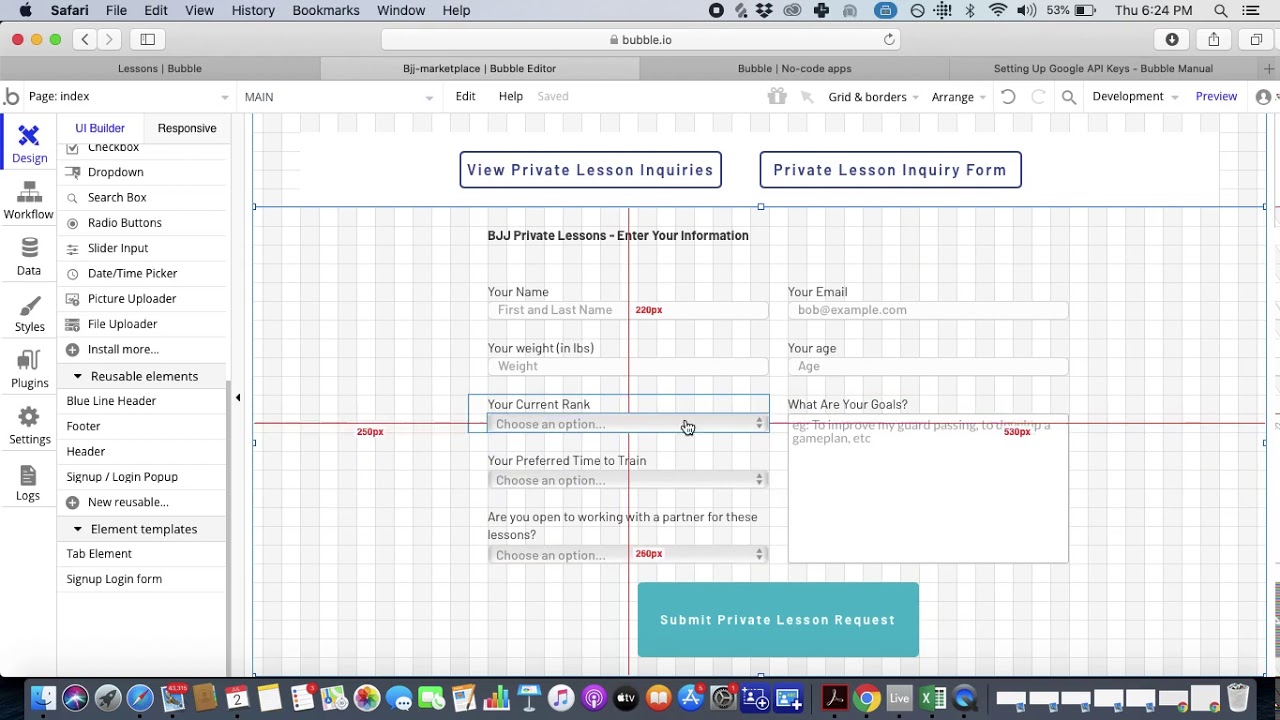
Bubble is a visual web app builder that's been operating since 2012, with a large community of developers and extensive plugin marketplace.
What does it do better than Adalo?
Bubble's 12+ year head start has produced an impressive ecosystem. The platform offers over 400 templates and a thriving community that continuously creates plugins like SendGrid for email and Mapbox for mapping.
This ecosystem depth means you can often find pre-built solutions for common features, potentially saving development time if the exact plugin you need exists.
Where Adalo has the advantage
The platforms serve fundamentally different use cases. Bubble builds web apps only—its mobile offering is a wrapper around the web app, which can introduce performance challenges at scale and means updates don't automatically sync across web, Android, and iOS versions.
Adalo creates true native iOS and Android apps from a single codebase. One build publishes to web, Apple App Store, and Google Play Store simultaneously, with changes syncing across all platforms.
Pricing and predictability differ significantly:
| Feature | Adalo | Bubble |
|---|---|---|
| Starting price (web + mobile) | $36/month | $59/month |
| Database records | Unlimited on paid plans | Limited by Workload Units |
| Usage-based charges | None—unlimited usage | Workload Units with variable calculations |
| Native mobile apps | Yes—true native compilation | Web wrapper only |
| App store publishing | Unlimited updates included | Limits on republishing |
Bubble's Workload Units create billing uncertainty—complex operations consume more units, making costs difficult to predict. Adalo eliminated usage-based charges entirely, so there's no bill shock as your app grows.
Bubble's customization flexibility often results in slower applications under increased load, and many users end up hiring experts to optimize performance. Claims of millions of MAU on Bubble typically require significant expert assistance. Adalo's purpose-built architecture maintains performance at scale without requiring optimization consultants.
Who is it best for?
Bubble requires a few months to become proficient due to its learning curve. It's suited for users building web-only applications who value ecosystem depth over native mobile performance.
Pricing
Bubble starts at $32/month (billed monthly) for basic features. The Growth Plan at $134/month adds security features like 2-step authentication. However, the $59/month tier is required for comparable web and mobile functionality to Adalo's $36/month plan.
Final Verdict
Bubble offers the most extensive ecosystem for web app development. For native mobile apps with predictable pricing and no record limits, Adalo is the stronger choice. Note that most third-party comparisons between these platforms predate Adalo 3.0's infrastructure overhaul in late 2025, which delivered 3-4x speed improvements and unlimited database storage.
#4 The Best Adalo Alternative for Enterprises
Betty Blocks
What is it?
Betty Blocks is an app builder designed specifically for large organizations requiring enterprise-grade features and custom deployment options.
What does it do better than Adalo?
Betty Blocks serves a market segment with specific enterprise requirements: Fortune 500 companies, large organizations, and businesses needing custom SLA agreements. They offer customizable packages tailored to each organization's unique compliance and security needs.
Betty Blocks allows you to run your app on-premise or on your own servers. This appeals to organizations with strict data residency requirements, existing infrastructure investments, or IT policies mandating internal hosting.
However, Adalo's 3.0 infrastructure now scales to 1 million+ monthly active users with no upper ceiling. For organizations that don't specifically require on-premise deployment, Adalo's cloud infrastructure provides enterprise-level reliability without the overhead of managing your own servers.
Who is it best for?
Betty Blocks exclusively serves large enterprises—they don't offer products for small or medium businesses. If you're a startup or SMB, Betty Blocks isn't an option.
Pricing
You need to contact Betty Blocks directly for pricing information. Enterprise pricing typically involves custom contracts based on organizational requirements.
Final Verdict
For enterprises requiring on-premise deployment or custom enterprise agreements, Betty Blocks specializes in this market. For organizations comfortable with cloud deployment, Adalo's scalable infrastructure handles enterprise-level traffic without the complexity of custom contracts.
#5 The Best Adalo Alternative for Internal Business Tools
Noloco
What is it?
Noloco is an app builder focused specifically on internal business applications like CRMs, project management tools, and operational dashboards.
What does it do better than Adalo?
While Adalo handles both public-facing and internal apps, Noloco specializes exclusively in internal business tools. This focus means they've optimized for CRM pipelines, project management boards, and accounting tools specifically.
Noloco serves organizations of all sizes, from small teams to large enterprises. Team members familiar with JavaScript can customize Noloco apps with custom code.
However, Adalo's Sheetbridge feature offers a compelling alternative for spreadsheet-based internal tools—it turns a Google Sheet into an actual database, providing the easiest path from spreadsheet to app without database-related learning curves.
Who is it best for?
Noloco has a narrow focus: businesses building internal tools only. It doesn't support public-facing apps like social networks, e-commerce platforms, or consumer applications. If you need both internal and customer-facing apps, you'd need multiple platforms—or just Adalo.
Pricing
Noloco doesn't offer a free tier. Pricing starts at $49/month (billed monthly) for teams up to 10 users. For teams up to 50 members with custom code capabilities, you'll pay $149/month (billed monthly).
Final Verdict
For businesses focused exclusively on internal tools, Noloco's specialization provides purpose-built features. For organizations needing both internal and public-facing apps, Adalo's versatility—with over 3 million apps created on the platform—offers more flexibility from a single tool.
Choosing the Right Platform
Each alternative serves a specific niche: Bravo for Figma designers, Draftbit for developers wanting code access, Bubble for web-only apps with ecosystem depth, Betty Blocks for enterprise on-premise requirements, and Noloco for internal business tools exclusively.
For entrepreneurs, freelancers, and businesses wanting native mobile apps with predictable pricing, Adalo's AI-powered approach—with unlimited database records, no usage charges, and direct App Store publishing—provides the fastest path from idea to launched product.
FAQ
Why choose Adalo over other app building solutions?
Adalo is an AI-powered app builder that creates true native iOS and Android apps from a single codebase. Unlike web wrappers, it compiles to native code and publishes directly to both the Apple App Store and Google Play Store. With unlimited database records on paid plans and no usage-based charges, you get predictable costs as your app scales.
What's the fastest way to build and publish an app to the App Store?
Adalo's drag-and-drop interface and AI-assisted building let you go from idea to published app in days rather than months. Magic Start generates complete app foundations from descriptions, and Adalo handles the complex App Store submission process—certificates, provisioning profiles, and store guidelines are managed for you.
Which is more affordable, Adalo or Bubble?
Adalo starts at $36/month with unlimited usage and database records. Bubble's comparable tier starts at $59/month with Workload Unit limits that can increase costs unpredictably. Adalo also includes native mobile app publishing, while Bubble only offers web wrappers for mobile.
Which is easier for beginners, Adalo or Draftbit?
Adalo is significantly easier for beginners. Its interface is described as "easy as PowerPoint," and AI features like Magic Add let you add features by describing what you want. Draftbit requires knowledge of APIs, JSON, and React Native basics before you can get started.
Is Adalo better than Bubble for mobile apps?
Yes. Adalo creates true native iOS and Android apps, while Bubble's mobile offering is a web wrapper. Native apps perform better, especially under load, and Adalo's single codebase updates web, iOS, and Android simultaneously. Bubble requires managing separate versions.
Can I migrate from Bubble to Adalo?
While there's no automatic migration tool, Adalo's Magic Start can generate a new app foundation from a description of your existing app. Many users find rebuilding in Adalo faster than expected due to AI-assisted building, and gain native mobile apps in the process.
How does Adalo compare to FlutterFlow?
FlutterFlow is low-code, requiring technical knowledge and separate database setup. Users often spend significant money on experts to achieve scalability. Adalo includes an integrated database with unlimited records on paid plans, and its visual builder can display up to 400 screens at once versus FlutterFlow's limited view.
Can Adalo apps scale to millions of users?
Yes. Adalo 3.0's modular infrastructure scales to 1 million+ monthly active users with no upper ceiling. The platform processes 20 million+ data requests daily with 99%+ uptime. Unlike app wrappers that hit performance constraints under load, Adalo's purpose-built architecture maintains speed at scale.
Does Adalo have database record limits?
No. All paid Adalo plans include unlimited database records. This is a key differentiator from platforms like Bubble (limited by Workload Units), Glide (limited by data rows), and Softr (limited by records per app). With proper data relationship setup, Adalo apps scale beyond 1 million MAU.
What AI features does Adalo offer?
Adalo includes Magic Start (generates complete app foundations from descriptions), Magic Add (adds features from natural language requests), and X-Ray (identifies performance issues before they affect users). AI Builder for full prompt-based app creation and editing is coming in early 2026.








